Having a play with a Sangoma SBC, or NSC, to realize there's little information on how to configure it for Lync/Skype4B and the information that it's out there is very fragmented, so I though I should share my install/config.
You get the ISO from http://wiki.sangoma.com/NSC-Download and install it. On the initial install you will configure the basic stuff, hostname, ip/gw/dns and you will define the default root password.
Once it completes you will do everything else using the web portal.
The way you configure your SBC is up to you. I usually go with 2 IPs, one listening on the SIP trunk provider side and one listening on the Skype4b side but, it's possible to have a working SBC using a single IP as well but I find it more complicated to configure and to debug, if you have any problem.
So first thing was to add a second IP to the box in Configuration -> Network
So, I'm using two internal IPs, 10.201.32.75 as the SIP trunk provider side and 10.201.32.76 as the Skype4b side.
Next, you go to Configuration -> Media Profiles and you create a media profile for Skype4B, which should include PCMA (g711a) and PCMU (g711u).
There's other codecs available to choose so depending on what your SIP trunk provider supports and if you are willing to do transcoding on the SBC (processing power goes up!) you could add them to the list.
Next, you go to Configuration -> SIP Profiles and you create one profile for each side. In my case, .75 for the SIP Trunk provider (Gamma) and .76 for my lab pool (Skype4B).
For my external side, I choose my .75 IP, 5060 port and TCP, on the media profiles I choose the previous created profile with PCMU and PCMA.
Assuming you will also do NAT with the SBC, you will need to fill the External IP Address with the public IP. I've also enabled Lync interoperability on this side of the leg even though, quite honestly, I still don't know what it does :)
Everything else I left default. We'll come back to this page to add a routing plan, which we haven't created yet.
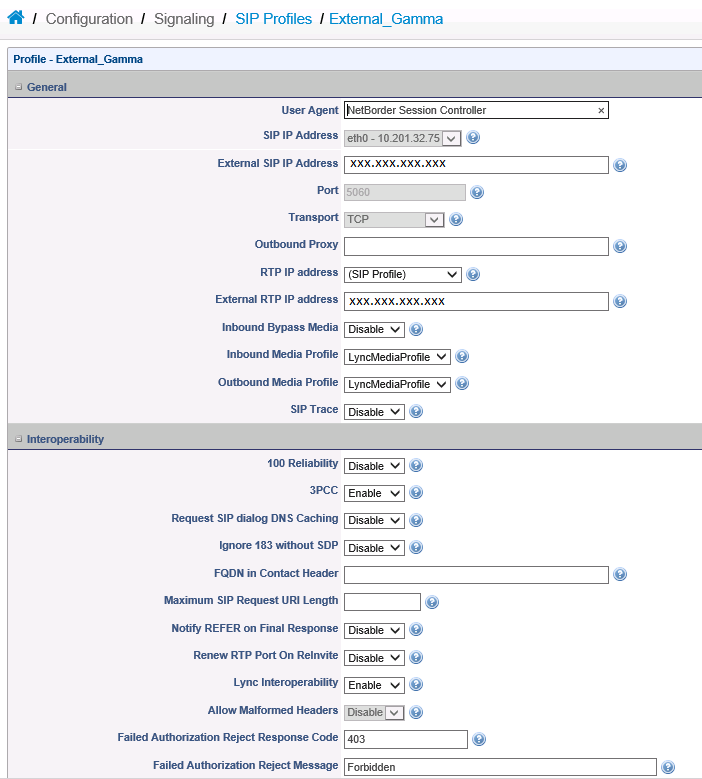
For my internal side, I choose my .76 IP, 5060 port and TCP, and selected the previous created media profile as well as enabling Lync interoperability.
Next you create your Trunks and you assign them to a SIP Profile. I created the Gamma Trunk with the Gamma SIP Profile and changed the transport to TCP.
Do the same for Skype4B but also fill OPTIONS 3 boxes as per below.
Go to Configuration -> Routing and add two routes, one for Skype4B to PSTN and one for PSTN to Skype4B.
I used Basic Call routing as I only want "pass-through" rules so the basic routing is fine for that. For Advanced routing you will be scripting the flow of the call yourself.
The basic routing is quite simple, it's a If Then clause. In this case, anything coming from Lync, just send to the Gamma Trunk.
And anything coming from Gamma, just send to the Skype4B Trunk.
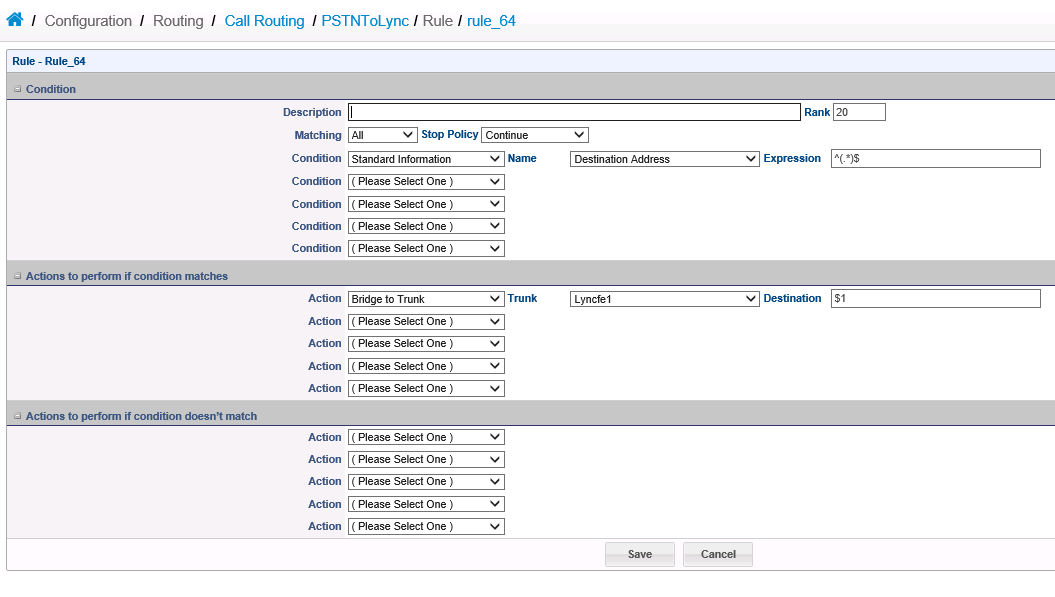
Now, go back to the SIP Profiles, edit the public side (Gamma in my example) and change the routing to the PSTNtoLync
And do the same for the internal side (Skype4B)
Once that's done you will need to click on Configuration on the top right and apply all of the configuration you have just done.
Some configuration changes will require just a reload, some will require a reboot.
Once that's done, go to the Dashboard -> Control Panel to start the Vega Session Controller (if you haven't already) and you are done.
Showing posts with label Lync 2013. Show all posts
Thursday, 9 July 2015
Friday, 13 June 2014
Lync Presence stuck on Updating...
I've recently came up with an issue where some users on a contact list would show up as stuck on "Updating..." and others would show the presence fine. It was a pool with 3x FEs and it was easy to pinpoint it was something probably related to one of the FEs.
Looking at the Event Viewer I found several errors from "LS User Services" Event ID 32042 and 30988. Event ID 32042 was complaining about not trusting the other FEs certificate, which was very odd has nothing had changed in a long time.
I had a look at the problematic FE Certificates store and found a non self-signed certificate in the Trusted Root Certification Authorities which is a problem for the Windows Server 2012 OS as per following article.
All I had to do was to remove that certificate from the container, reboot the server and things went back to normal.
From what I can gather the certificate had been in that store for quite a while but the issue only manifested itself after the server rebooted.
Now all I have to do is to find whoever stuck the certificate in that store... and beat him with a stick :)
Looking at the Event Viewer I found several errors from "LS User Services" Event ID 32042 and 30988. Event ID 32042 was complaining about not trusting the other FEs certificate, which was very odd has nothing had changed in a long time.
I had a look at the problematic FE Certificates store and found a non self-signed certificate in the Trusted Root Certification Authorities which is a problem for the Windows Server 2012 OS as per following article.
All I had to do was to remove that certificate from the container, reboot the server and things went back to normal.
From what I can gather the certificate had been in that store for quite a while but the issue only manifested itself after the server rebooted.
Now all I have to do is to find whoever stuck the certificate in that store... and beat him with a stick :)
Saturday, 3 May 2014
Move CMS
Not exactly new but I guess it's the first time I'm moving CMS without being a Domain Admin.
Technet article will tell you only need RTCUniversalServerAdmins but that's wrong. If you are not a Domain Admin you will get this error, one for each server in the pool you are moving your CMS into:
Warning: Failed to create new instance of "Server FQDN" at "LS CentralMgmt Service".
Technet article will tell you only need RTCUniversalServerAdmins but that's wrong. If you are not a Domain Admin you will get this error, one for each server in the pool you are moving your CMS into:
Warning: Failed to create new instance of "Server FQDN" at "LS CentralMgmt Service".
And you won't be able to Enable-CsTopology.
Re-run Enable-CsTopology with a Domain Admin account to create the instances needed. After that you will need to start the Lync Server Master Replicator Agent. In my case when I did that, I got a error in my FE saying it couldn't access the CMSFileStore file share but after stopping all the services and bringing them back the issue was gone.
Friday, 11 April 2014
Cumulative update package for Lync 2013: April 2014
Download:
Update for Microsoft Lync 2013 (KB2880474) 64-Bit Edition
Update for Microsoft Lync 2013 (KB2880474) 32-Bit Edition
Update for Microsoft Lync 2013 (KB2880474) 64-Bit Edition
Update for Microsoft Lync 2013 (KB2880474) 32-Bit Edition
Issues that the update fixes
This cumulative update resolves the following issues:- 2941631 Cannot drag a distribution group to change position in your contact list in Lync 2013
- 2941639 Call forwarding to the Response Group fails in Lync 2013
- 2941640 Desktop sharing session stops in Lync 2013 when all screen data is updated
- 2941643 Caller cannot close the window of a transferred call in Lync 2013
- 2941654 Update sorts and searches contacts by Furigana in Lync 2013
- 2941658 CTRL+TAB does not work when you switch between conversation windows in Lync 2013
- 2941682 Instant message appears using incorrect text format when the DisableRTFIM setting is enabled in Lync 2013
- 2941659 Callee's name and detailed information is missing from the conversation history of a Lync 2013 outgoing call
- 2941636 Search fails in Lync 2013 when non-Latin characters are used in a different case from the AD DS attributes
- 2941635 Can’t sign in to Lync 2013 when Office 365 account UPN differs from domain account UPN
- 2954951 Slow screen update in application sharing or desktop sharing session in Lync 2013
- 2955577 Lync 2013 takes a long time to sign in after reconnect to the network
- 2955579 Lync 2013 displays un-encoded texts in a toast notification or an instant message sent to another messaging client
- 2955580 Update adds a button to show details about limited functionalities when Lync 2013 connects to a backup pool
Thursday, 13 February 2014
Wednesday, 12 February 2014
Lync 2013 Android update
Is out since last night
What's new:
What's new:
- Quickly rejoin to a Lync Meeting you just left
- Pick up your conversations from the point you ended them.
(...) the Lync team also improved the media and audio routing for the client. The work was mainly to support new devices and newer Android OS versions, in addition to the audio flow throughout the client (handset, speaker phone and headset).
More information here
Wednesday, 5 February 2014
Lync 2013 Server performance and monitoring
Microsoft just released two new documents:
Key Health Indicators: The Foundation for Maintaining Healthy Lync Servers
Lync Call Quality Methodology poster
This should point you on what to monitor on the servers and then moving on to devices and network.
Key Health Indicators: The Foundation for Maintaining Healthy Lync Servers
Lync Call Quality Methodology poster
This should point you on what to monitor on the servers and then moving on to devices and network.
Monday, 20 January 2014
Lync 2013 and Windows Server 2012 R2
I've come across some issues with Lync 2013 and Windows Server 2012 R2 (TLS fix is applied!)
Working on a project with 2 Pools and a number of SBSs and for some reason every couple of days the users on the SBSs go into Outage Mode. After reading the logs I can see "TLS negotiation failed" and after that the SBS can't talk to the FEs anymore, can't even browse to any Web Service on that FE.
Haven't figured out what's actually wrong but rebooting the FEs seems to be the only way to fix it.
I'll post more info once I have it but for now I would stay away from 2012 R2 if you are thinking of deploying SBSs
Working on a project with 2 Pools and a number of SBSs and for some reason every couple of days the users on the SBSs go into Outage Mode. After reading the logs I can see "TLS negotiation failed" and after that the SBS can't talk to the FEs anymore, can't even browse to any Web Service on that FE.
Haven't figured out what's actually wrong but rebooting the FEs seems to be the only way to fix it.
I'll post more info once I have it but for now I would stay away from 2012 R2 if you are thinking of deploying SBSs
Thursday, 9 January 2014
Lync 2010 and 2013 updates
New updates are out for Lync 2010 and 2013
- Lync Server 2010 7577.225
- Lync Server 2013 8308.577
- Lync Server 2013 Debugging Tools 8308.577
- Lync Server 2013 Resource Kit Tools 8308.577
- Lync Phone Edition 7577.4420
- Polycom CX500, CX600 and CX3000
- Aastra 6721ip and 6725ip
- Polycom CX700 and Nortel 8540
- HP 4110 and 4120
- Lync 2010 Client 7577.4419
- 32bit Download - What does it fix?
- 64bit Download - What does it fix?
Wednesday, 4 September 2013
Microsoft Lync Server 2013 Protocol Workloads Poster
Microsoft just released the new version of the Lync 2013 protocol workloads poster.
You can download it here.
Thursday, 15 August 2013
SQL Clustering now supported in Greenfield scenarios
Using SQL Mirroring and SQL Clustering
Lync Server 2013 supports the user of either SQL mirroring or SQL clustering for each Lync Server database. You can easily set up SQL mirroring with the Topology Builder tool in Lync Server 2013. For SQL failover clustering, you must use SQL Server for setup.
Lync Server 2013 supports SQL clustering topologies for all deployments, including greenfield deployments and organizations that have upgraded from previous versions of Lync Server.
SQL Clustering support is for an active/passive configuration. For performance reasons, the passive node should not be shared by any other SQL instance.
The following support is included:
Two-node failover clustering for the following:
Microsoft SQL Server 2012 Standard (64-bit edition). Additionally running the latest service pack is recommended.
Microsoft SQL Server 2008 R2 Standard (64-bit edition). Additionally running the latest service pack is recommended.
Up to sixteen-node failover clustering for the following:
Microsoft SQL Server 2012 Enterprise (64-bit edition). Additionally running the latest service pack is recommended.
Microsoft SQL Server 2008 R2 Enterprise database software (64-bit edition). Additionally running the latest service pack is recommended.
More information @ Technet
Friday, 16 November 2012
Lync 2013 with Office Web Apps Server
After instalation of the Office Web Apps Server and integration with Lync 2013 you might find out that Lync 2010 clients can upload and view powerpoints but Lync 2013 clients do not.
You might see this error on the Lync FE:
Syncing Office Web Apps Server with legacy presenters failed, newer clients may have lost sync for PowerPoint presentations driven by the legacy clients.
Last attempted Url: https://WebAppsFQDN/m/present_2_0.asmx
Microsoft documentation says you need to install these:
Add-WindowsFeature Web-Server,Web-Mgmt-Tools,Web-Mgmt-Console,Web-WebServer,Web-Common-Http,Web-Default-Doc,Web-Static-Content,Web-Performance,Web-Stat-Compression,Web-Dyn-Compression,Web-Security,Web-Filtering,Web-Windows-Auth,Web-App-Dev,Web-Net-Ext45,Web-Asp-Net45,Web-ISAPI-Ext,Web-ISAPI-Filter,Web-Includes,InkandHandwritingServices
But there's a few features missing for this to work
Add-WindowsFeature NET-Framework-Features, NET-Framework-Core, NET-HTTP-Activation, NET-Non-HTTP-Activ, NET-WCF-HTTP-Activation45Add this ones, restart the Office Web Apps service and everything should be working now!
Friday, 17 August 2012
Subscribe to:
Posts (Atom)
