Showing posts with label mobile. Show all posts

Thursday, 13 August 2015

Announcing the preview of Skype for Business apps for iOS and Android


We’ve seen great momentum in the first few months since the arrival of Skype for Business, and today, I’m excited to announce the preview of the new Skype for Business apps for iOS and Android. Here’s a look at what’s new and how you can participate in the preview.
What’s new?

We’ve infused Skype simplicity throughout the new iOS and Android apps, created a new dashboard for easy navigation of your contacts, calls and meetings, and updated the In-Call and In-Meeting experience.

The updated dashboard brings the contact search bar, your upcoming meetings and most recent conversations to one place.


Contact search bar—Search your Global Address List by first name, last name, email alias or even a phone number! On IOS, your phone contacts are also included in the search.
Upcoming appointments—Here you can see your current and next meetings in your calendar. You can either click through to read more about the meeting or click the Quick Join icon to join the meeting right away.
Recent conversations—Makes it easy to refer back to your most recent chats, phone calls and meetings.

We rebuilt the In-Call and In-Meeting experience with new features that make it easier to navigate calls and meetings on your mobile phone or tablet.


Larger buttons make it easier to mute, add participants and manage your call.
Video, which now fills the screen, brings you closer to your colleagues.
We made it easier to navigate between video and content with just one tap by simplifying the IM, video and content panes. While you can still view content in full screen, you can now also view content and see the speaker’s video at the same time!
Join our preview

If you have Lync 2013 on your iOS or Android device, you’ll get the new Skype for Business app as an update later this year. Skype for Business mobile apps work for anyone on Lync Server 2013, Skype for Business Server 2015 and Skype for Business Online.

To ensure IT administrators can prepare their end users and organizations for this change, we’ve added our Skype for Business iOS and Android apps to our Skype for Business Preview program.

To participate in the preview, IT administrators can visit www.skypepreview.com to nominate up to four end users for iOS and four for Android to participate in the preview. Please apply by Friday, August 14, 2015 to be considered in our first batch of participants. We will begin notifying IT admins via email of their acceptance starting the week of August 17, 2015.

Sign up for the Skype for Business for iOS and Android Preview today!

Tuesday, 7 July 2015

Skype for Business Windows Phone app is here!

It’s an exciting time for Skype for Business as we deliver communication-powered productivity in Office. In the last few months, we’ve delivered the Skype for Business client for Windows, the new Skype for Business Server, and Skype for Business Online in Office 365. And just last week, we announced previews of new meetings and voice capabilities in Office 365 through the Skype for Business Preview Program.

Today we’re pleased to announce the availability of the Skype for Business app for Windows Phone.

What’s new—intuitive interface, more emoticons, improved server communications


150702 blog post for SFB WP App v2 DRAFT 1

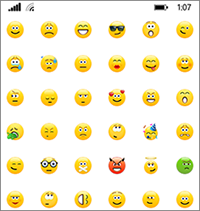
If you are familiar with the Lync app for Windows Phone, you’ll notice a number of enhancements in the new app. The most noticeable differences right off the bat are the Skype for Business brand and UI, which is intuitive and familiar if you happen to use Skype in your personal communications. We’ve also revamped emoticons, which now offers over 100 emoticons to land your message visually.

We have improved how the app and the server handle conversation notifications. Once you’re notified of a new conversation on your phone, the other clients you have logged in won’t be able to grab the conversation and prevent you from responding on your phone.

We’ve also enhanced security with at-rest data encryption, so your conversation history and voicemail is encrypted by default.

And your most recent conversations are now synchronized across devices whether they took place on your PC, tablet or phone, as long as you’re running the latest server software. We’re working hard to enable that for Office 365 users as well, so stay tuned for more news to come.

How you can upgrade today


Most people who have the Lync 2013 app on their Windows Phone will be automatically updated to the new Skype for Business app, but here are the particulars depending on which version of Windows Phone you use:
If you have a Windows Phone 8.1 and higher but do not have the Lync 2013 app, you can download the new Skype for Business app in the Windows Store.
If you have Windows Phone 8.1 and higher and currently have the Lync 2013 mobile app, the new Skype for Business app will replace your existing app and tile automatically.
If you have Windows Phone 8.0, you will continue to use Lync 2013 or Lync 2010, which remains compatible even if your organization is running the new Skype for Business Server.

We hope you enjoy the Skype for Business app for Windows Phone!
From office.com

Wednesday, 24 June 2015

See what's new in Skype for Business for Windows Phone


If you already use Skype to stay in touch with friends and family in your life away from work, you'll appreciate the power and simplicity of Skype for Business for Windows Phone 8.1. It's easy to find and connect with co-workers using the devices you already have, and take care of business through an enterprise-grade secure platform. If you're coming to Skype for Business from Lync, you'll recognize all of the features you already use, but with a fresh new interface, simplified controls, and some great new additions:
  • New look and feel
  • Emoticons
  • Encrypted local data
  • New features available with Skype for Business Server 2015

New look and feel
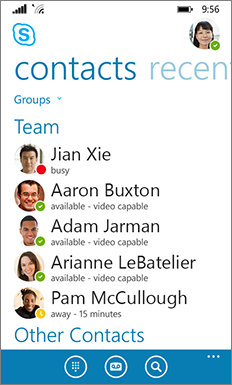
If you’re a regular user of the consumer version of Skype, then Skype for Business will seem very familiar: the Contacts list, presence indicators, buttons and icons, and even the app sounds should make you feel right at home

.

Of course, all the essential Lync features are still there—like the Quick Actions buttons, which let you IM or call a contact (and more) with just two taps
.

In the conversation window, chat text is formatted so you can easily see who’s talking.


Emoticons

Skype for Business now includes the same set of emoticons found in the consumer version of Skype.


Encrypted local data

All Skype for Business data stored locally on the phone—for example, recent conversations, voice mails, pictures and user settings—is now encrypted.

NOTE You may need to uninstall and reinstall Skype for Business to turn on this feature. Go to Settings  >About to see if encryption is already set up. If not, uninstall and reinstall the app to turn on data encryption.


New features available with Skype for Business Server 2015

If your organization is using Skype for Business Server 2015, you'll see better integration between Skype for Business for Windows Phone and your other devices, and the ability to communicate with users of the commercial version of Skype.
  • Windows phone conversation sync Your recent conversations are now automatically synchronized across devices. You can see all your conversations, regardless of whether they took place on your desktop or mobile device. This allows you to continue a recent conversation or respond to missed IMs—wherever you are.
  • Improved IM reliability When you receive an IM on your mobile device, it's automatically accepted even if you miss the alert.
  • Communicate with Skype contacts If you have Skype users in your contact list, you can communicate with them via IM, audio call, or video call.
From office.com

Thursday, 13 February 2014

Lync 2013 Android update - Proximity sensor bug

Seems like last update introduced an issue with the proximity sensor on the phone.

Read more here.


Wednesday, 12 February 2014

Lync 2013 Android update

Is out since last night


What's new:

  • Quickly rejoin to a Lync Meeting you just left
  • Pick up your conversations from the point you ended them.
(...) the Lync team also improved the media and audio routing for the client. The work was mainly to support new devices and newer Android OS versions, in addition to the audio flow throughout the client (handset, speaker phone and headset).

More information here

Wednesday, 14 July 2010

Description of the update for Communicator Mobile 2007 R2: July 2010

There's a new update for Communicator Mobile. You can get it here.

Issues that this hotfix package fixes

  • Provides home screen support for new home screens in Windows Mobile 6.5+ phones.
  • Provides integration within the phone dialer for Windows Mobile 6.5+ phones.
  • Enables Communicator Mobile 2007 R2 to recognize when the phone is roaming and by default prevents Communicator Mobile 2007 R2 from signing in to roaming networks.
  • Provides additional support for joining conference calls from a Windows Mobile appointment. To do this, press Menu, and then press Join Conference.
  • Lets users log on by using a user name in the user@example.com format, in addition to the domain\user format.
  • Enables the functionality by which callbacks are now automatically accepted when the user uses the Call via Work option.
  • Resolves the problem in which the Microsoft Installer (.msi) installation fails on a Windows XP Service Pack 3 (SP3)-based computer. In this situation, users should install Communicator Mobile 2007 R2 by using a (.cab) installation.
  • Fixes the problem in which AT&T FUZE devices that are set for a High-Speed Downlink Packet Access (HSDPA) connection cannot handle voice and data at the same time. In this situation, calls that use the Call via Work option fail unless the device is reverted to 3rd Generation (3G) by disabling HSDPA.